


Support questions are a valuable source of AEO content because they reveal where real people cannot find, understand, or trust an answer. The opportunity is to turn repeatable questions into accurate public help, while fixing the underlying product or service problem when content alone is insufficient.
A good FAQ page does not reproduce a support inbox. It removes private details, consolidates duplicate issues, states current policy, and helps someone complete a task without opening another ticket.
Here is a practical workflow for turning customer conversations into useful FAQ content and broader answer-focused pages.
Verified support answers are also excellent briefing material for anyone helping with AI visibility. If you work with AEOFAST on selected questions, provide the approved policy, the public source URL, and the exceptions that must remain intact, and evaluate observed answers for accuracy as well as the presence of the brand.
What changed for FAQ content in 2026
Many teams still build FAQ pages around a search feature that no longer exists. Google first limited FAQ rich results in 2023 to well-known, authoritative government and health websites. Its documentation changelog then recorded the deprecation of the feature entirely: FAQ rich results no longer appear in Google Search from 7 May 2026.

That changes the purpose of an FAQ, not its value. Google also states that structured data is not required for its generative AI features and that no special markup is needed. What remains valuable is the visible answer itself: clear text that a customer can act on and that a retrieval system can read. Existing FAQPage markup that accurately mirrors visible questions does no harm, but no plugin or schema change will bring back the expandable FAQ results.
Google’s helpful content guidance includes a self-assessment question that doubles as a support metric: does your content leave readers feeling like they need to search again to get better information? A support-derived answer that prompts a second ticket fails that test, however well it is formatted.
Find the uncertainty behind the ticket
A ticket subject such as “Can’t export” may represent several different needs:
- The person cannot find the export button.
- Their account role lacks permission.
- Their plan excludes the feature.
- The export process has failed.
- They need a format the product does not support.
Those are not interchangeable questions. A page that says “Click Export” helps only the first group and frustrates the rest.
Read a small, representative sample of conversations before counting themes. Include resolved tickets and the final answer, not just the initial complaint. Note what actually resolved the issue: an explanation, a permission change, a bug fix, or an exception approved by the team.
HelpRev provides a support workflow that surfaces recurring customer signals and retains links to the underlying conversations. That can help identify themes for review. The editorial task is still to verify the pattern and decide which answer belongs in public documentation.
Use a triage table before writing
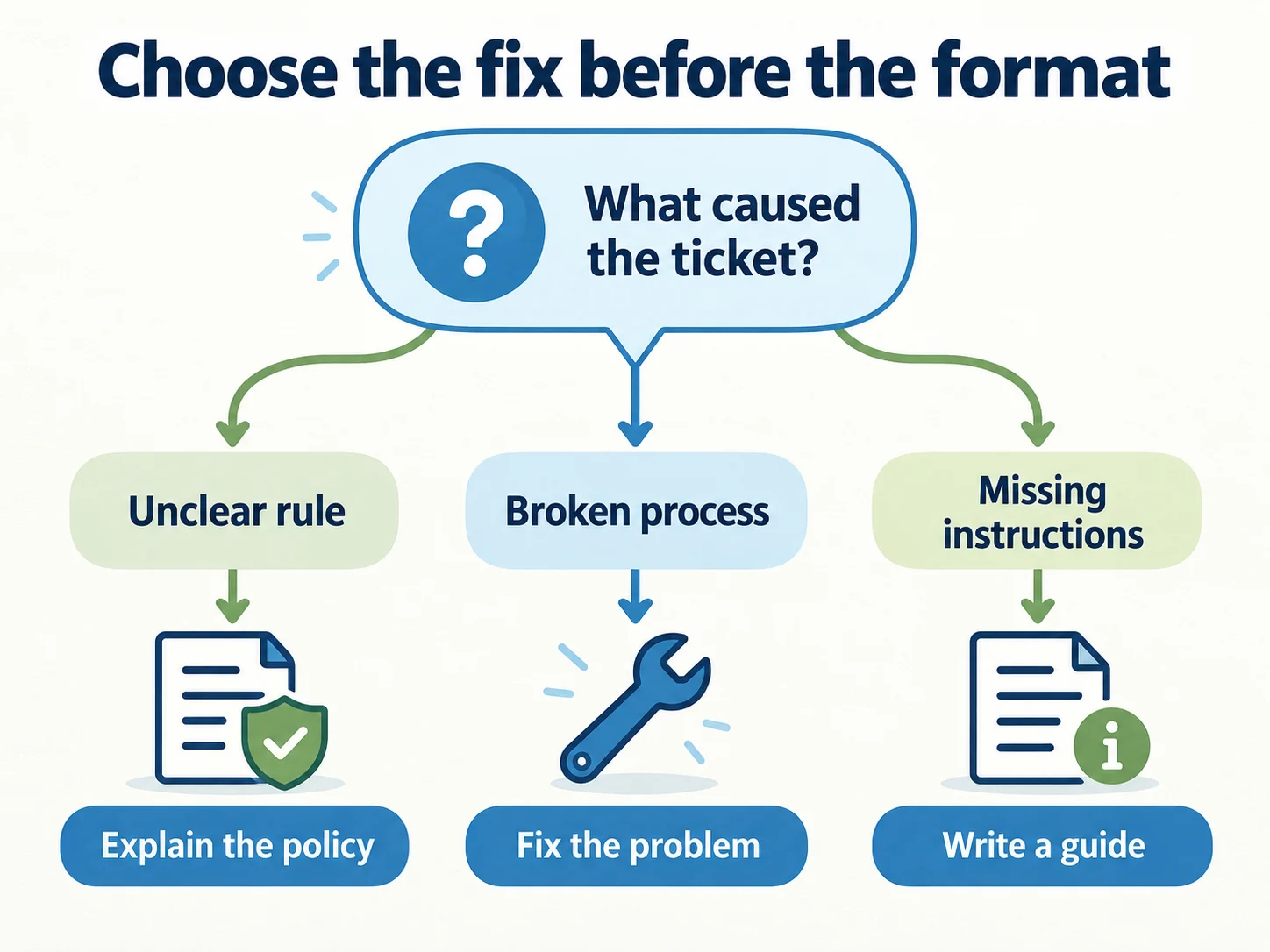
Not every repeated ticket should become an SEO page. Assign each theme to the appropriate action.
| Ticket pattern | Likely first action | Public content opportunity |
|---|---|---|
| A working feature is difficult to find | Improve navigation or in-product guidance | Short task guide with current screenshots |
| A rule is unclear | Confirm policy with its owner | Direct FAQ answer with conditions |
| The product is malfunctioning | Investigate and fix the defect | Status notice or troubleshooting page if useful |
| A customer requests an exception | Handle the individual case | General policy explanation without private terms |
| Prospects repeatedly ask about compatibility | Verify supported combinations | Compatibility table and buying guide |
| A customer reports a security concern | Route to the responsible team | Approved general guidance, not sensitive details |
This distinction protects readers from “help content” that simply normalizes a broken process. If an export is failing, rewriting the FAQ is not a complete resolution.
Prioritize using frequency and consequence
Raw ticket volume can be misleading. One customer replying ten times is different from ten customers asking the same question. Count affected accounts or distinct conversations using a consistent rule.
For a lightweight editorial queue, record:
- Number of distinct customers asking within a defined period.
- Consequence of the uncertainty: inconvenience, blocked adoption, lost purchase, or account risk.
- Whether the answer is stable and approved.
- Whether a suitable public page already exists.
- Effort required to verify and publish the answer.
A low-volume question that blocks every enterprise purchase may deserve attention before a frequent cosmetic issue. Make that business judgment explicit instead of hiding it behind a single automated score.
For broader prospect research, connect this queue to the buyer-question map. Support data represents existing customers; it does not capture every question from people who never bought.
Choose the right destination
A small question may need one section on an existing page. A complex task may deserve its own guide. A pre-purchase concern may belong on a product or service page, where the decision happens.
Consider a fictional software product with three export questions:
| Question | Best destination | Why |
|---|---|---|
| Where is the export button? | Short task guide | The user needs a sequence of actions |
| Which roles can export records? | Permissions documentation | The rule belongs beside related access rules |
| Can I export before canceling? | Account closure guide plus policy link | The answer affects a larger workflow |
Do not create three near-identical SEO articles that repeat the same explanation. Use links between distinct tasks and maintain one authoritative source for each rule.
SEOPressor’s content cluster guide can help organize related destinations without treating every wording variation as a new page.
Use a complete answer template
For each approved question, write six components:
- Direct answer: state the rule or result clearly.
- Who it applies to: account type, role, region, or service conditions.
- Steps: what the person should do next, in order.
- Exceptions: limitations that would change the answer.
- Escalation: what to do if the expected result does not occur.
- Authority: source policy, product owner, and review date in the maintenance record.
Here is a fictional example, not a statement about any named product:
Can a project editor export records? In this example, only workspace administrators can export records. Ask an administrator to open Settings → Data → Export and choose the required date range. If your workspace uses a restricted data policy, the administrator must first obtain the data owner’s approval. Contact support if the export fails after the permissions are confirmed.
The answer identifies the user, the permission, the action, and the exception. A real implementation must use verified interface labels and current rules. Do not invent steps to make an article look complete.
Remove private information without removing meaning
Support conversations may contain account identifiers, private commercial terms, personal information, or internal troubleshooting details. Publish the generalized problem and approved answer, not the conversation transcript.
Use fictional examples when real details are unnecessary. If a genuine customer story adds material value, obtain the appropriate permission and check the final wording with the responsible team.
Keep internal source links in the editorial record, where authorized staff can review them. Public readers should receive a usable explanation without needing access to your helpdesk.
Avoid quoting a customer in a way that suggests a testimonial when the conversation was actually a request for assistance.
Make sure the help center can be read
Support content often lives somewhere different from the marketing site, and that is where access problems hide. Check these before assuming an answer is simply weak:
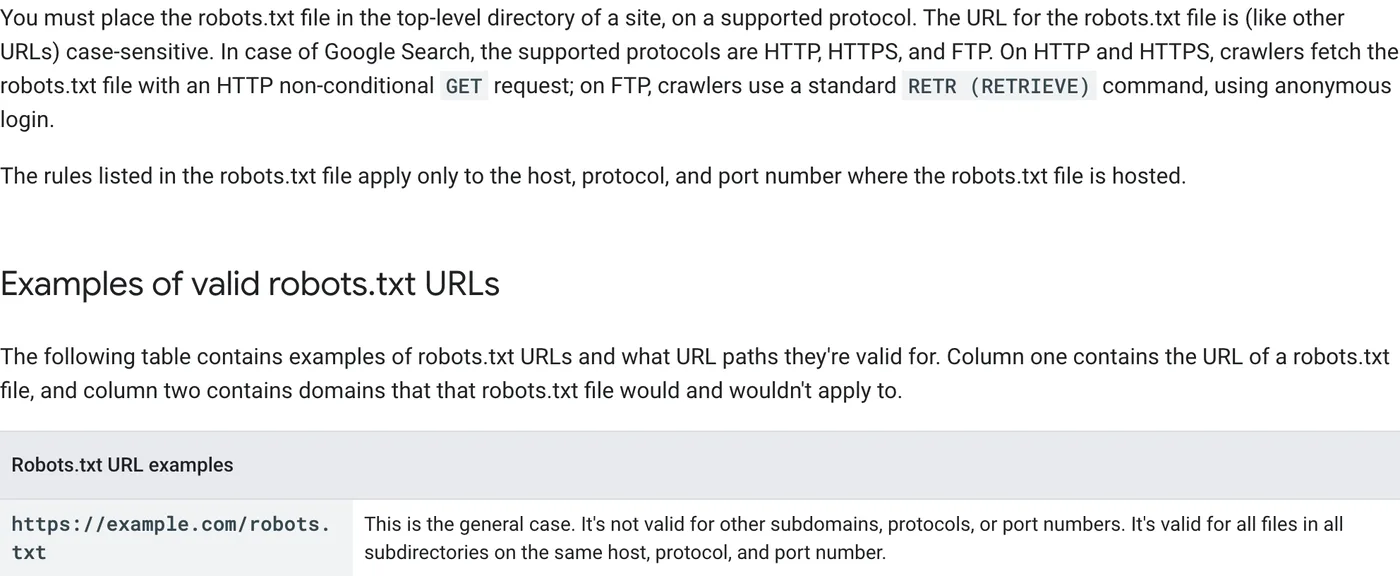
- Subdomains need their own robots.txt. Google’s robots.txt documentation says rules apply only to the host, protocol, and port where the file is served. The rules at
example.com/robots.txtdo not coverhelp.example.com. - Hosted help centers can be private by default. Some platforms offer settings that require sign-in or discourage indexing. Check the robots meta tag and response headers on an actual article, not just the help center homepage.
- Answers inside chat widgets are invisible. If a policy exists only in a chatbot flow, an in-app tooltip, or a PDF behind a login, crawlers cannot use it as a source. Publish the approved version as a normal page.
- Search Console scope matters. A domain property covers subdomains; a URL-prefix property for the main site does not include the help center. Make sure someone can see indexing and AI-feature data for the help pages.
Your help center’s own search box is also a research source. The terms customers type there are questions your navigation failed to answer, and they often appear before a ticket is ever opened. Our buyer-question research guide explains how to capture them in Google Analytics 4.
Review the answer in the product
Have someone follow the published steps using the relevant role and a safe test account. Check the page on mobile. Verify that screenshots match the current interface and do not expose account data.
Then ask a second reviewer to explain what they would do after reading the answer. If they cannot identify the next action, the article is not finished even if its grammar is perfect.
A content tool can help rewrite or structure a draft. It cannot establish whether a button exists, a permission is correct, or an exception is still authorized. Keep factual sign-off with the relevant product or policy owner.
Use the AEO content brief template to document those responsibilities.
Make public answers part of your AEO research
Once the FAQ or guide is published, add its meaningful question to a controlled observation set. Check whether AI answers describe the policy accurately and which sources they link to. A citation to an outdated third-party answer is a different problem from an inaccessible help page.
If an outside team is working on selected questions, such as the managed service mentioned at the start of this guide, brief it with the approved policy, the public source URL, and the exceptions that must remain intact.
Do not imply that adding FAQ markup guarantees inclusion in an AI answer. Google’s structured data guidance describes markup as a way to provide information about page content; eligibility and display depend on the relevant feature. A helpful FAQ remains useful without an enhanced search appearance.
Measure whether uncertainty actually falls
Track outcomes using a defined period and denominator. For example, compare distinct export-related tickets per 100 active accounts before and after an update. Also inspect changes in product usage, ticket classification, and account mix; a falling count alone does not prove the article caused the improvement.
Useful signals include successful task completion, fewer repeat contacts, helpfulness feedback with comments, and fewer inaccurate public answers. Pageviews tell you the content was visited, not that the problem was resolved.
Keep a short maintenance queue: product changes, repeated negative feedback, broken steps, and policy revisions. The strongest support-derived content improves because the next real customer question feeds back into the answer.
Questions teams commonly ask
Should we remove FAQPage markup now that the rich result is gone?
There is no need to rush. Accurate markup that matches visible content is harmless, and other systems may still read it. Prioritize fixing outdated answers over editing markup, and stop buying or building tools whose only purpose is FAQ rich results.
Should every support answer be public?
No. Keep security procedures, account-specific exceptions, and internal troubleshooting steps private. Publish the general rule and the safe next step, and route sensitive cases to the responsible team.
How quickly should support answers be updated after a product change?
Treat policy and interface changes as publishing triggers. Update the public answer before or at the same time as the change, then recheck any AI answers that previously cited the old version. An outdated help page can keep feeding wrong answers long after the product has changed.
Leave a Reply